Through authentic discovery, I have grown familiar with the presence of Cyber Commandos of the civilian variety. Some resemble militants while others are very much aligned with stereotypical hacker images.
*These commandos operate on their own volition*
The commandos may offer services that are valuable to those who have copyright material or intellectual property for some reason, or another has been put in areas of the web that are highly accessible or freely accessible to anyone. Sources are easily operated within by average computer literate or illiterate users. These commandos make it inaccessible for anyone not accessing this material through the owner’s approved method. This can result in securing cash flow to the owners and negating theft or sharing of their material. It is notable that the material owners are sometimes powerless to the distribution of their work. If it’s on the internet, then it can be shared or stolen. That is why cyber commandos are employed.
*Their Image*
The image of a Cyber Commando is very important to them, you will not find a lack of militant equipment; it can be summed up with the aesthetic of warxcore but for those of us who are not privy to such terms. The fatigues of a mercenary sums it up rather nicely and they are often equipped with such equipment. Exceptions to this rule are that some cyber commandos operate as hacktivists and that brings with it a different uniform. Their image remains important, it can be the resume or cv of the commando, a bravado borne from the operations they conduct and the clients they have.
*Why have such an image?*
This creates anonymity for the Cyber Commando and such an image can be intimidating to those whose monetary flow is disrupted by their services. Adding a layer of protection or intimidation for their clients benefit.
*Ethics*
A Cyber Commando can navigate a complex ethical landscape in their efforts to secure copyrighted intellectual property. While their mission may be justified, their methods can sometimes blur the lines between ethical and unethical behavior. For instance, they might use social media to identify and target individuals wrongfully possessing copyrighted material, employing aggressive or morally questionable techniques to neutralize these threats.
The role of a Cyber Commando often resembles that of a digital mercenary, where decisions must constantly be weighed against their personal moral compass. Balancing the need to protect intellectual property with the imperative to avoid unethical practices is a challenging aspect of their work. Ultimately, the ethical stance of a Cyber Commando is shaped by their individual values and the choices they make in the face of these dilemmas.
–
*Marketing*
Cyber Commandos market themselves on social media either through direct messaging or referrals by past clients. They can also be found in less than savory locations on the web in forums where more clear mercenary work is advertised. This service is highly sought after by content creators whose products and content are only accessible behind a pay wall
*What do they do?*
Cyber Commandos participate in a few services while skimming ethical boundaries such as getting copyrighted content off popular web resources with DCMA claims that are in place to protect us all.
Tracking down unauthorized social media profiles that depict an individual’s stolen identity. Then getting them taken down by any means to which can produce an immediate effect.
–
*Who do Cyber Commandos piss off?*
Scammers, Conman, and all-around web-based tricksters.
–
*Why use a cyber commandos service*
If you are an individual that produces social media content and content that is behind a paywall you could benefit from such services rendered by a Cyber Commando.
from being used against their interests, which is making money for the most part and this also can aid in protecting others from being catfished! By using the same content to steal from or lead on victims.
You should be aware that using a cyber commandos services can be essentially hiring a mercenary to do your bidding even though the techniques used have potential to be ethically sound; still run the risk of them committing crimes on your behalf.
*That would be Illegal* – *If you or someone you know are looking for such a service provider I cannot give you that information: these services run on the line and are often times the commando resorts to unethical social engineering or flat-out intimidation that often only comes back to hurt the client.*
–
*Cyber Commandos that conduct passive operations that produce outcomes that are legally sound and ethical are essentially a white hat with a cooler look but when any line is crossed they have now become another HaaS (hacking as a Service) thug.*
Still serious about utilizing such services or find yourself in need of them :
Reach out to your local police department and begin a case
Offer the information of your adversary to the FBI through the web crime portal >here<
Make a claim to the IC3 internet crime complaint >here<
*Keep in mind that a cyber commando is typically utilizing protections that are already available to us all please become aware of the DCMA Guidelines for further explanation* https://www.copyright.gov/dmca/
*I understand that many in my audience are aspiring cybersecurity professionals. That’s why I’ve included information about how becoming an IT Support Specialist (Tech Support) can help pave the way toward achieving a cybersecurity role.*
In the fast-paced world of modern technology, IT Support Specialists (Tech Support) are the very unlikely heroes of the story of business time and time again. They ensure that systems run smoothly, issues are resolved promptly, and users stay productive. Their role goes beyond just fixing technical problems; they are instrumental in maintaining productivity, ensuring security, fostering innovation, and ultimately, ensuring customer satisfaction.
Despite its importance, IT Support is a title not many people enjoy speaking about; it is surrounded on all sides with animosity. One side being Users, another being the tech support agents themselves, most of the other sides are of toxic work experiences and environments. However, IT Support Specialists can be the saving grace to productivity and money-making. It is a structured role with many aspects that support the organization and anything that falls into the SLA (Service Level Agreement) for customers. This not only means that you are asked to provide expertise to users, but you may be asked to provide that same expertise to your company in the way of fixing any hardware/software issues.
IT Support Specialists are required for most, if not all, operating businesses. Even if not explicitly stated, a business will have to provide this role over the phone or in person in some capacity eventually. SLAs are only limited when scopes are shrunk due to constraints based on time and money. To completely understand what is required of an IT Support Specialist, I have researched and collected the following.
Educational Requirements and Skills Needed
While a high school diploma is typically the minimum requirement, having a degree in Computer Science or Information Technology can significantly enhance employment prospects. Technical skills, including proficiency with computer systems and hardware, are essential, as are customer service skills and the ability to think critically and solve problems. Additionally, certifications such as CompTIA A+, Microsoft Certified: Azure Fundamentals, or Cisco’s CCNA can provide an edge in the competitive job market, showcasing specialized knowledge and commitment to the field. These credentials can demonstrate a candidate’s technical competence and dedication to continuous learning, which are highly valued by employers.
What can make you best prepared to fit in the role of IT Support Specialist level 1 includes several key attributes and experiences.
Being the go-to person, your friends and family ask to fix any electronic device issue they may encounter indicates a natural aptitude for troubleshooting and problem-solving.
An innate curiosity and interest in fixing problems are essential, as these roles often involve diagnosing and resolving a variety of technical issues.
Politeness, empathy, and charisma are equally important, as IT support specialists need to communicate effectively and provide excellent customer service, often to frustrated users.
Completing an Information Technology support course, either online or through a college program, can provide a solid foundation of knowledge and skills, preparing you to handle the diverse challenges faced in an IT support role. These experiences and attributes combined can set the stage for a successful career in IT support.
While formal education and technical skills are important for success as an IT Support Specialist level 1 position, personal qualities such as a helpful nature, problem-solving skills, and empathy are equally essential. Being the go-to person for tech support among friends and family, showing an interest in problem-solving, and possessing strong interpersonal skills are all indicators of readiness for this role. By combining these qualities with relevant education and training, individuals can position themselves as highly effective and valuable IT support professionals.
The Interview
Regardless of whether you are seeking an IT Support Specialist role or a Cybersecurity role these questions should be answerable by you. In a cybersecurity interview it would be ridiculous to hear such questions as these, because the interviewer should SHOULD* have technical knowledge and experience pertaining to that job role but I digress. In any case the following questions should be of trivial conversation for someone with experience in IT that is why, I am in this eluding to using this job role to break into the IT industry to gain real world experience.
In interviews, candidates may be asked about their experience with servers or switches, office suite software, printers, and computers. They may also be asked how they deal with frustrated customers and whether they are more comfortable with PCs or Mac devices.
*Every interview should be asking questions that fall under the qualifications listed in the advertisement*
Questions you will more than likely be asked in the interview:
Do you have experience working with servers, switches, or other networking equipment?
Are you familiar with and experienced in using office suite software?
Can you describe your experience with printers and computers?
How do you handle situations where customers are frustrated or angry with you?
Are you more comfortable working with PCs or iOS & Mac devices?
How do you approach learning about new technologies or software?
Have you ever worked on a team project to implement a new system or technology? What was your role and contribution?
Can you discuss a time when you had to explain technical information to a non-technical audience? How did you ensure they understood?
Have you identified and implemented process improvements in your support role? What was the improvement and its benefits?
How do you prioritize and manage your workload when dealing with multiple support requests?
How do you troubleshoot technical issues when you’re unsure of the cause?
Can you describe a time when you handled a confidential or sensitive information security issue? How did you ensure security and privacy?
Have you encountered and resolved particularly challenging technical problems in your previous roles? How did you approach the resolution?
You want to pull from experience the most you can as a retelling of something that personally happened to you is engaging to the interviewer and to all those who hear. If you have no experience in anything related to the question pertaining to your past occupations, then use something from either your family or friend group that you went through. If that is not an option, you must consider speaking to the educational background you hold and information you hold when it comes to the situation or hardware/software devices.
Certifications
Certifications are a critical component of building a strong foundation in the IT field. They not only validate your skills and knowledge but also demonstrate your commitment to professional growth. Certifications such as CompTIA A+ and Microsoft Certified: Windows Server Fundamentals are particularly valuable, as they provide a broad understanding of essential concepts in IT support and server management, respectively.
CompTIA A+ is renowned for its comprehensive coverage of hardware, networking, and software topics, making it a versatile certification for aspiring IT professionals. It serves as a solid entry point, equipping individuals with the fundamental skills needed to excel in various IT roles.
Similarly, the Microsoft Certified: Azure Fundamentals certification is highly regarded for its focus on cloud computing principles and Microsoft Azure services. In today’s digital age, cloud computing is a key driver of innovation and efficiency in businesses, making this certification particularly valuable.
For those interested in networking, Cisco’s CCNA certification is a must-have. It covers a wide range of networking topics, including routing and switching, which are essential for building and maintaining modern network infrastructures.
Furthermore, the Dell Certified Technician certification demonstrates proficiency in Dell’s hardware products, which is valuable for individuals working in environments that rely heavily on Dell technologies.
Lastly, the ITIL certificate is essential for those interested in IT service management. It provides a framework for managing IT services and helps organizations align their IT services with business goals.
Overall, these certifications can greatly enhance your qualifications and open up a wide range of opportunities in the IT industry. However, it’s important to note that certifications should be complemented by practical experience gained through internships or entry-level positions to truly stand out in the competitive IT job market.
Career Path
*This is an extremely small excerpt as a career path as IT Support Specialist branches out to nearly every single position a expert can hold in IT.*
It should be known starting out, IT support specialists often handle basic customer service and support tasks, gradually moving into roles with more responsibility and specialization. Advanced positions may involve senior technical support roles or transition into related fields like network administration or cybersecurity.
What this Job Role can look like day to day
*The role of an IT Support Specialist can be performed in-person or remotely.*
Being an IT Support Specialist has the ability to be an intimidating experience, always asked to answer questions that elude the user or organization. That is why its important to organize your workday but also equally as important to remain flexible to give attention to any emergencies (which as a level I you may not ever be aware of). IT Support Specialist’s typically use a ticketing system that is triaged this allows the organization to maintain documentation and complete research into the issue faster.
*The Ticketing system is important and can be an entire article by itself*
The IT Support Specialist is a role filled with opportunities to perform professionally. Some IT Support Specialist job roles may have different titles but the same responsibilities here I will attempt to produce those titles:
Technical Support Specialist Help Desk Technician IT Support Engineer IT Help Desk Analyst Customer Support Specialist IT Technician Live Chat Specialist System Support Specialist Technical Support Engineer Help Desk Technician IT Service Desk Analyst Desktop Support Technician Virtual IT Helpdesk Analyst Telecommute IT Service Desk Analyst Remote Technical Support engineer
*The list can continue with the interchanging of the above words, but they all perform the same duties and are very much IT Support Specialists*
Many of these titles may allude to being performed onsite as Technician can often imply or simply use the word Remote within the title itself. I will give one example of remote and onsite job roles of differing titles day-to-day duties and work. See if you can match the similarities.
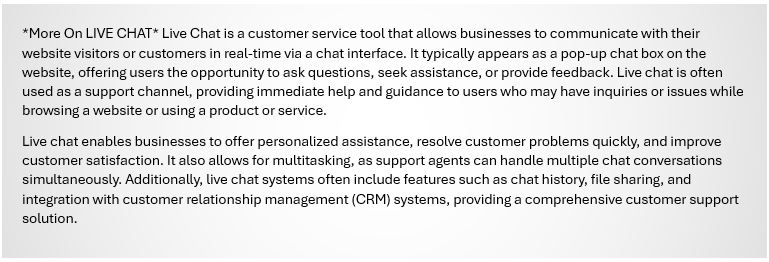
One remote IT Support Specialist role typically begins with interactions through a portal, often initiated by a user this portal is often called “Live Chat.” Taking this as a overarching duty can allow your role to be remote and you can known as the Live Chat Specialist, where the day-to-day experiences can be of the following:
*I am speaking with a sense of generalized day-to-day typicality of being a remote tech support operator. *
A day in the life of a Live Chat Specialist can vary depending on the organization and the nature of the role, but here’s a general overview:
Morning Preparation: Review any updates or announcements from the team or organization. Check the schedule for the day and prioritize tasks.
Engagement and Support: Start responding to live chat queries from customers or website visitors. Provide technical assistance, answer questions about products or services, and troubleshoot issues.
Multitasking: Handle multiple chat conversations simultaneously, ensuring that each customer receives prompt and accurate assistance.
Documentation and Reporting: Keep detailed records of chat interactions, including issues raised and resolutions provided. Generate reports on chat volume, response times, and customer satisfaction.
Collaboration: Work closely with other support team members and departments to escalate complex issues and ensure timely resolution.
Continuous Learning: Stay updated with product or service changes, new features, and industry trends. Participate in training sessions to improve technical knowledge and customer service skills.
Quality Assurance: Adhere to established guidelines and standards for live chat support, ensuring consistency and quality in customer interactions.
Feedback and Improvement: Provide feedback to the team and management on common issues or areas for improvement in the live chat support process.
End-of-Day Wrap-Up: Review the day’s interactions, complete any pending tasks or documentation, and prepare for the next day’s workload. Throughout the day, a Live Chat Specialist needs to maintain a professional and helpful demeanor, even when dealing with challenging or frustrated customers. Effective communication skills, both written and verbal, are essential for success in this role.
Here are some great websites that can help you be the best Live Chat Specialist you can be:
TechRepublic – Offers articles, downloads, and forums for IT professionals, including those in remote tech support.
Spiceworks – A community-driven site for IT professionals with discussion forums and resources for remote tech support.
TechSupportForum – A forum for tech support professionals to discuss issues and share knowledge, including remote tech support topics.
As an on-site IT Support Specialist it is your responsibility to provide technical assistance and support to clients or customers in person, rather than remotely. Typical duties include installing, maintaining, and troubleshooting hardware and software, as well as setting up and configuring computer systems and networks. They may also train end-users on how to use new technologies and provide technical support for issues that cannot be resolved remotely. What a day in the life can typically look like:
Morning Preparation: Begin by checking and assigning new tickets and responding to emails. Review any updates or announcements from the team or organization. Check the schedule for the day and prioritize on-site tasks.
Engagement and Support: Start responding to on-site technical queries and issues from customers or employees. Provide assistance with password resets, software installations and configurations, computer and network troubleshooting, and any escalations or transfers.
Engagement continued: Handle on-site tasks, ensuring that each customer or employee receives prompt and accurate assistance. This may include responding to emails, taking calls, and working on tickets.
Documentation and Reporting: Keep detailed records of on-site interactions, including issues raised and resolutions provided. Maintain documentation for tickets, calls, and other interactions. Generate reports on on-site support activities.
-Go To Lunch-
Collaboration: Work closely with other on-site support team members and departments to escalate complex issues and ensure timely resolution. Collaborate with colleagues on problem-solving and troubleshooting.
<The next two points are to be conducted as a professional within your own space and time>
Continuous Learning: Stay updated with on-site changes, new technologies, and industry trends. Participate in training sessions to improve technical knowledge and customer service skills.
Quality Assurance: Adhere to established guidelines and standards for on-site support, ensuring consistency and quality in customer interactions. Ensure that on-site support activities meet quality standards.
Feedback and Improvement: Provide feedback to the team and management on common issues or areas for improvement in on-site support. Contribute to improving processes and workflows within the on-site support team.
End-of-Day Wrap-Up: Review the day’s on-site interactions, complete any pending tasks or documentation, and prepare for the next day’s workload. Organize, prioritize, and plan out the next day’s on-site tasks, responding to any remaining on-site requests before wrapping up for the day.
*Whether you are remote or on-site there are many things that correlate and require your attention*
Performance Metrics
Performance as an entry-level professional is often measured by the number of closed tickets. However, it’s important to understand that efficiency in closing tickets is not the only measure of success. IT support specialists can be highly specialized in other aspects of IT, and their performance may be measured differently in different organizations.
I understand that being level 1 IT support can seem meaningless if you are pursuing a cybersecurity role, but this job not only provides you with experience aiding all users within your organization it can also provide you with a launchpad to achieve that coveted cybersecurity role. These roles are no-brainers to their impact on a business and really does translate flawlessly to the bottom line with measures taking place at nearly all points of interaction during resolving issues. Some such metrics are:
QOS – Quality of Service: The overall performance of a service, often in terms of its ability to meet customer expectations.
TAT – Turnaround Time: The time taken to complete a task or fulfill a request.
FCR – First Call Resolution: A measure of the percentage of customer inquiries or issues resolved on the first call.
KPI – Key Performance Indicator: A measurable value that indicates how well an organization is achieving its Key business objectives.
CSAT – Customer Satisfaction
NPS – Net Promoter Score: A metric used to gauge customer loyalty by asking how likely they are to recommend a company’s product or service.
As I am listing these terms It has dawned on me that I should include some common terminology that is used in this line of work for your benefit:
SLA – Service Level Agreement: a contract between a service provider and customer that specifies the level of service.
CRM – Customer Relationship Management: Software that helps manage a company’s interactions with current and potential customers.
ITIL – Information Technology Infrastructure: A set of basic practices for delivering IT services.
CS – Customer Service: The assistance and advice provided by a company to those people who buy or use its products or services.
CMDB – Configuration Management Database: A database used to store config records throughout heir lifecycle.
RCA – Root Cause Analysis: A method of problem-solving used for identifying the root causes of faults or problems.
KB – Knowledge Base: a database used for collecting , organizing, and retrieving knowledge to enhance understanding and provide solution.
So, the listed above terms are very much for the customer support facing aspects of being a IT Support Specialist. As a specialist you may be asked to be not only fully committed to providing solutions to customers over the phone but also in person whether that means at a customers site or on the same premises you conduct customer service resolutions over the phone. It all depends on your job description and the skills which you can offer your employer.
Essential Functions and Responsibilities
IT support specialists are responsible for answering helpdesk calls, providing systems support, creating and maintaining support documentation, and actively participating in the ticketing process. They diagnose and resolve software and hardware incidents, install and deploy new IT equipment, and maintain service level agreements for tickets assigned.
Maintaining Productivity, Ensuring Security, Fostering Innovation, and Customer Satisfaction are the four main pentacles in what an IT Support Specialist needs to uphold.
As an IT Support Specialist, maintaining productivity, ensuring security, fostering innovation, and ensuring customer satisfaction are paramount. Productivity is improved by swiftly resolving technical issues to minimize downtime. Security involves implementing and maintaining robust security measures to protect systems and data. Fostering innovation includes staying updated with technology trends and proposing solutions to enhance efficiency. Customer satisfaction is achieved by providing timely and effective support, exceeding expectations whenever possible.
Balancing these four pillars ensures a successful and impactful IT support role. Maintaining Productivity: IT Support Specialists play a crucial role in maintaining the productivity of an organization by promptly addressing technical issues. This involves responding to help desk tickets, troubleshooting hardware and software problems, and ensuring that all systems are running smoothly. By minimizing downtime and ensuring that employees have access to the tools they need to do their jobs effectively, IT Support Specialists contribute significantly to the overall productivity of the organization.
Ensuring Security: Security is a top priority for IT Support Specialists, as they are responsible for protecting sensitive data and systems from cyber threats. This includes implementing and maintaining security measures such as firewalls, antivirus software, and intrusion detection systems. IT Support Specialists also play a role in educating employees about best practices for security, such as using strong passwords and being cautious of phishing attempts.
Fostering Innovation: IT Support Specialists are often at the forefront of technological innovation within an organization. They are responsible for staying up-to-date with the latest technology trends and identifying opportunities for improvement. This may involve recommending new software or hardware solutions that can enhance productivity and efficiency. By fostering a culture of innovation, IT Support Specialists can help drive positive change within an organization.
Customer Satisfaction: Ultimately, the goal of an IT Support Specialist is to ensure that end-users are satisfied with the support they receive. This involves providing timely and effective assistance, as well as being responsive to feedback and concerns. By building strong relationships with end-users and demonstrating a commitment to their needs, IT Support Specialists can help ensure that customers are happy and productive.
By upholding these four pillars, you as a IT Support Specialists can make a significant impact on the success of an organization.
Creating Solutions
An IT support specialist plays a crucial role in creating and implementing solutions that enhance an organization’s efficiency and productivity. They diagnose and troubleshoot hardware and software issues, ensuring minimal downtime and optimal performance. By staying updated on the latest technological advancements, they can recommend and integrate new tools and systems tailored to the organization’s needs. Additionally, they develop and maintain security protocols to protect sensitive data, provide training to staff to maximize the effective use of technology, and offer continuous support to adapt to evolving technical challenges. Through proactive problem-solving and a deep understanding of the organization’s infrastructure, IT support specialists significantly contribute to the seamless operation and strategic growth of the business.
Continual Professional Development
Staying current with technology and best practices is essential. Continuous learning through courses, webinars, and conferences, as well as building a professional network, can provide opportunities for career advancement.
I have curated the following news resources and social media resources to best suite a IT Support Specialist so you can be kept informed and prepared for anything in your position that is of not your own doing.
Command Line Heroes is a podcast by Red Hat that delves into the stories of developers, programmers, and open-source enthusiasts who have significantly impacted the technology landscape. Each season explores various themes, such as the evolution of programming languages, the history of computing, and cybersecurity threats. Hosted by Saron Yitbarek, the podcast aims to inspire and educate listeners about the ever-changing world of technology. For more details and to listen to episodes.
IT Career Energizer offers a podcast hosted by Phil Burgess, featuring over 350 IT professionals sharing their career experiences and insights. The podcast aims to help listeners start, develop, and build successful tech careers through actionable advice and inspirational stories. It also provides regular updates and exclusive content for subscribers, focusing on skill development and career advancement in the tech industry.
Super User is a Q&A community for computer enthusiasts and power users. It focuses on a wide range of topics related to computer software, hardware, and networking. Users can ask questions, provide answers, and share their expertise on issues like operating systems, software applications, networking, hardware troubleshooting, and more. It’s part of the Stack Exchange network, which hosts various other specialized communities. The platform encourages detailed, high-quality answers and active participation.
Microsoft Q&A is a platform on Microsoft Learn where users can ask and answer technical questions about various Microsoft products and technologies. It supports a wide range of topics, including .NET, Azure, Microsoft 365, and more. The site offers articles on how to use the platform effectively, such as writing quality questions and answers. It also connects users to other Microsoft communities for additional support and engagement.https://www.reddit.com/r/sysadmin/ –
The subreddit r/sysadmin is a community for system administrators to discuss a wide range of topics related to IT and systems administration. It includes posts about technical issues, career advice, industry news, and various tools and software. Members often share tips, solutions, and experiences, making it a valuable resource for anyone in the field of IT.
Conclusion
IT support specialists play a crucial role in modern technology, ensuring that systems run smoothly, issues are resolved promptly, and users stay productive. Their role goes beyond just fixing technical problems; they are instrumental in maintaining productivity, ensuring security, fostering innovation, and ultimately, ensuring customer satisfaction. By upholding these pillars, IT support specialists can make a significant impact on the success of an organization.
Notes from the author: I want you to understand what is asked of a SOC analyst and what they do and how they do it.**
*I hope this article can aid you in not just becoming one but a great one.*
What is the Role of a SOC Analyst in Cybersecurity?
In today’s digital landscape, cybersecurity has emerged as a paramount concern for organizations worldwide. Security Operations Center (SOC) Analysts play a pivotal role in this domain, dedicated to monitoring and safeguarding an organization’s IT infrastructure, networks, and data. Working within a Security Operations Center, these analysts address security issues at both organizational and technical levels, actively identifying, analyzing, and responding to security incidents to ensure the prompt detection and mitigation of potential threats, thereby maintaining the integrity and confidentiality of sensitive data.
Vigilance is not merely a creed but a responsibility for Security Operations Center Analysts, whose primary goal is adept identification using tools to monitor networks, systems, and applications. Any signs of unusual activity or potential security breaches serve as a call to arms, prompting analysts to delve deep and mitigate or halt such occurrences altogether. This task is facilitated by leveraging tools with scrutiny and a comprehensive understanding of cybersecurity and information technology fundamentals.
Upon identifying a threat, SOC analysts embark on an investigative journey, utilizing tools tailored to the situation to uncover threat vectors and piece together a timeline and scope of the incident. This forensic examination provides valuable insights, allowing for the implementation of enhanced defenses against future attacks.
Once an incident requiring a response is identified, SOC analysts pivot to deliver decisive action, formulating strategies to contain, mitigate damage, and neutralize the threat. Whether it involves isolating compromised systems, blocking malicious IP addresses, or deploying patches and updates, precision execution is paramount in this battle, where swiftness is crucial for effective damage mitigation.
Preserving organizational integrity and confidentiality is paramount for SOC analysts. Through promptly detecting and mitigating potential threats, they safeguard sensitive data from malicious actors. This is achieved by much of the following:
*It should be noted that this is not every single thing a SOC analyst does but it will allow anyone to understand what they do.*
The Core Responsibilities of a SOC Analyst
SOC analysts utilize a variety of security tools and technologies, such as Security Information and Event Management (SIEM) systems, intrusion detection systems (IDS), and firewalls, to uphold the organization’s security posture. By analyzing security alerts and recognizing patterns of suspicious activity, they leverage their expertise to assess the severity and potential impact of security incidents. Staying updated on the latest cybersecurity threats and trends, SOC analysts contribute to both proactive and reactive defense strategies of their organization.
Some things you will be asked to do as a SOC analyst: Monitoring and Detection: Continuously monitoring network traffic and system logs to detect security threats.
Incident Response: Quickly responding to security incidents, conducting thorough investigations, and implementing effective solutions.
Compliance: Ensuring that the organization’s security measures comply with relevant regulations and standards.
Documentation: Assisting with building, auditing, and documenting secure IT infrastructures.
SOC analysts must possess strong analytical and problem-solving skills, enabling them to investigate incidents thoroughly and recommend effective solutions. They also need a comprehensive understanding of networking concepts, operating systems, and cybersecurity principles. Proficiency with security tools and technologies such as firewalls, SIEM, IDS/IPS, and antivirus software is essential. Awareness of common cyber threats, attack vectors, and mitigation strategies further enhances their ability to protect the organization.
Technical skills developed and tools used while being SOC analyst include:
Networking and Protocols: Excellent knowledge of TCP/IP, UDP, DNS, FTP, SSH, SSL/TLS, and HTTP protocols.
Security Solutions: In-depth understanding of technical security solutions like firewalls, SIEM, NIDS/NIPS/HIDS/HIPS, AVs, DLP, and proxies.
Threat Analysis: Ability to analyze and respond to undisclosed software and hardware vulnerabilities, and investigate, document, and report on emerging trends.
Scripting Languages: Proficiency in scripting languages, particularly Microsoft PowerShell, to automate tasks and improve efficiency.
Digital Forensics: Using such tools as Autopsy, EnCase Forensic, Sleuth Kit, Volatility, Wireshark, Splunk, Endpoint Security just to name a few.
Compliance and Regulatory Bodies
Compliance and regulatory knowledge are standards in cybersecurity being set by local, state, federal and otherwise for us to follow. Being a Security Operations Center analyst does not exempt anyone from such standards, in fact you supposed to be an expert when it comes to such things.
SOC analysts play a crucial role in ensuring that their organization’s security measures comply with various standards and frameworks. This can be called compliance and regulatory knowledge.
I will go over a few with only brief descriptions below:
FedRAMP: Federal Risk and Authorization Management Program.
NIST 800-53: National Institute of Standards and Technology’s guidelines for security controls.
ISO/IEC 27001: International standard for information security management.
GDPR, HIPAA, PCI-DSS, SOX: Compliance with regulations like the General Data Protection Regulation, Health Insurance Portability and Accountability Act, Payment Card Industry Data Security Standard, and Sarbanes-Oxley Act.
By understanding and adhering to these standards, SOC analysts help organizations maintain a strong security posture and avoid potential fines and legal issues.
Certifications
Certifications sought out by SOC analyst employers and themselves. As a SOC analyst it should be a goal to expand and test your knowledge in cybersecurity. Certifications are a topic for a whole article, but they should be on the horizon for a cybersecurity professional at the very least. While not always mandatory, certifications can significantly enhance a SOC analyst’s qualifications and credibility. Preferred certifications include:
Experience with SIEM and SOAR platforms, preferably Splunk or Google, is highly valued, along with a strong foundation in scripting languages like Microsoft PowerShell.
Cybersecurity Initiatives and Continuous Learning
SOC analysts are also key contributors to broader cybersecurity initiatives within their organizations. Their roles often involve:
Information Assurance: Ensuring that information systems are protected against unauthorized access and other threats.
Network Security: Implementing measures to secure network infrastructure and prevent data breaches.
Data Analytics and Machine Learning: Using advanced analytics and machine learning techniques to detect anomalies and predict potential security threats.
Cyber Response: Developing and executing response plans to mitigate the impact of security incidents.
Continuous learning is essential for SOC analysts to stay ahead of emerging threats and evolving technologies. Participating in training sessions, attending cybersecurity conferences, and obtaining advanced certifications are vital for maintaining their expertise.
Being a member of a Team
SOC analysts are commonly utilized in team settings as a need for them to be available to provide 24/7 coverage of a system is again common. Workload distribution is also important as this role is if you haven’t realized, extensive and can be far too cumbersome for an individual to perform.
SOC Analysts the Guardians of Cyberspace
SOC analysts are the frontline defenders of an organization’s cybersecurity framework. Their expertise in monitoring, detecting, analyzing, and responding to cybersecurity threats is indispensable in today’s digital world. By staying updated on the latest threats and continuously improving security measures, SOC analysts help organizations maintain a robust defense against cyber-attacks. Their role is not just technical but also strategic, ensuring that security policies comply with evolving regulations and standards, ultimately protecting the organization’s valuable data and infrastructure.
Youtube resource mention
A great resource on YouTube is a channel named Cyber Platter. There are extensive videos to prepare for SOC-related interviews and certifications: Cyber Platter YouTube Channel.
Even More Resources!
Join Tier 1 at LetsGoIT Patreon to gain access to the LetsGoIT Discord where you will have access to a wealth of learning materials tailored to illuminate the essentials and commonly used tools in various cybersecurity job roles. Visit LetsGoIT Patreon to join and delve into the resources available.
There seems to be a significant disconnect between aspiring cybersecurity individuals and students regarding landing or knowing one’s own future career opportunities. With cybersecurity being such a large industry that needs to fill job roles, I think this will help illuminate what it means to be a professional in this industry and help those unaware of the targets they are trying to hit for the role they are pursuing.
There is no reason for someone who is educated or possesses certifications in cybersecurity to be lost or at wits’ end about which job roles to apply to or what those job roles entail.
Also, there is a lot here, but this is not all of them! There are specialized units within the government that perform associated cybersecurity objectives that are not listed or out of your reach.
The document below is intended to aid those who feel that ever so common imposter syndrome that so many cybersecurity and IT professionals experience. If you are aware of what is required and you have those disciplines conquered, then there is no argument that you are qualified and have obtained that title.
Firstly, if you want success as a web application security analyst, you need to stay up to date with this dynamic category of Cybersecurity. I would recommend doing this socially whenever available, and some ways to do just that are:
Becoming an OWASP (Open Web Application Security Project) member:
Attending your local OWASP chapter meeting. These meetings are sometimes held remotely.
Following some inspirational professionals with skills in web application security is extremely rewarding such as Rana Kahlil and Nahmesec has a fantastic Udemy course in bug bounty hunting and web application hacking and or Jason Haddix produces The Bug Hunter’s Methodology Live Course set this June 2024 for aspiring bug hunters.*
All three of the above mentioned as extraordinary pentesters. Rana Kahlil operates the Rana Khalil Academy that will benefit anyone using the Burpsuite proxy.
Nahmesec and Jason Haddix have discussed methodology and performed web application pen testing on YouTube for our benefit as well.
That is not to say, “disregard other ethical hacking channels.” I just find the three mentioned to be sound professionals in this space.
I am done mentioning the amazing social resources you have to allow yourself to learn and hone web application security skills; now, I want you to be aware of what this role must be cognizant of, such as understanding common vulnerabilities and exploits, security tools, and technologies, as well as having a grasp of scripting and coding languages used in building web applications. Being stronger in one of those mentioned and not the other should not deter your motivation to be a web application security analyst. In fact, it should be the fuel that allows you to propel yourself into research and certification pursuit to build that strength and be better equipped to perform well as a web app sec analyst.
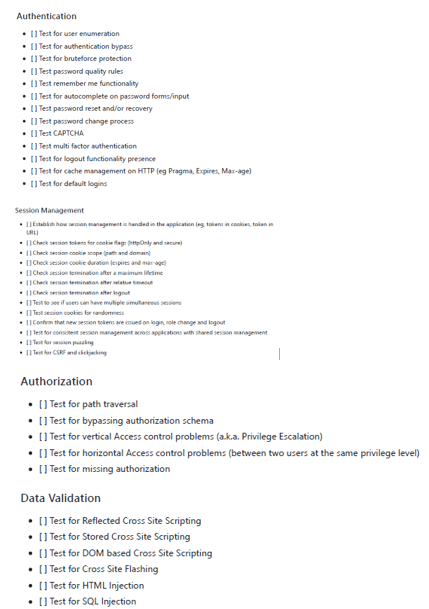
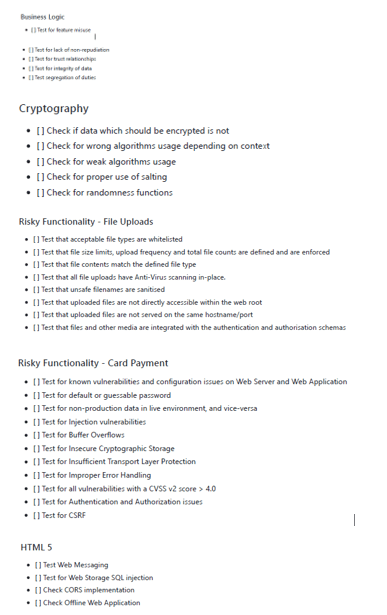
When conducting a web application security assessment for the first time, it will serve you well to combine the rudimentary with the extraordinary. Using a checklist created for bug hunters can be very beneficial to your mission. This checklist should be as extensive as possible and allow you to fall down every single hole that was dug before you through the aid of socially delivered content. You should remain curious and bold in your pursuits as you are a part of the organization’s immune system without your toil and remediation. A bad actor may become aware of an exploit and use it maliciously. I will supply you with something I came across socially, as in cybersecurity, it is in our best interest to share knowledge and be transparent. I may not be able to supply a link to this content, but I am in no way trying to pass it off as my own. With no author credited, we can only stand to reason that this is shared for the benefit of all those who would use it.
This checklist should look like the following:
This checklist was made using OWASP’s online resources. OWASP is a significant component of the arsenal of a web app security analyst and should be held in high esteem as it creates the standards and best practices for web application professionals to use to achieve compliance in many industries. OWASP has achieved this by being a community-based project that consists of international professionals, developers, and enthusiasts. OWASP aims to equip web application security analysts with a list of the top ten vulnerabilities, security tools, guidelines, and educational material. This is all powered by professionals who are motivated and passionate about security. OWASP is a vital and sacred part of being a web application security analyst, and it should be analyzed often.
Understanding OWASP is essential for your tasks in web app sec. The OWASP Top Ten is an updated list of vulnerabilities for you to examine and use while conducting audits, and it is worth mentioning that just because the OWASP Top Ten does not list a vulnerability does not make it any less important for you to experiment with in your audits. The OWASP Top Ten is a list of vulnerabilities that are perceived to be of the most risk. Not a list of all vulnerabilities that are able to be exploited.
The OWASP Top Ten Web Application list can be found at the following URL:
As a Web Security Application Analyst the need to understand web technologies such as the below are essential: HTML
CSS
JavaScript
HTTP/HTTPS
Web Servers and Databases
I will briefly explain what makes them essential for a web sec app professional.
HTML – Understanding HTML is crucial for a Web Application Security Analyst because it enables them to identify and analyze vulnerabilities like Cross-Site Scripting (XSS) and form manipulation by reviewing source code and understanding web page structures. It helps them grasp basic web functionality, client-side vulnerabilities, and how browsers render content. Knowledge of HTML is essential for creating and using effective security tools, performing manual security tests, and communicating effectively with developers to provide actionable security recommendations. Additionally, it allows analysts to contribute to building secure web applications by ensuring proper input validation and output sanitization.
CSS – Knowing CSS (Cascading Style Sheets) is essential for a Web Application Security Analyst because it helps in understanding how web pages are rendered and manipulated. This knowledge is crucial for identifying and mitigating security vulnerabilities related to the presentation layer of web applications. For example, attackers might use CSS to obscure malicious content or manipulate the appearance of elements to trick users into performing unintended actions (like clicking on a hidden link). Understanding CSS allows analysts to better detect and analyze such tactics, ensuring that they can effectively secure the entire web application.
JavaScript – Knowing JavaScript is crucial for a Web Application Security Analyst because it is a fundamental part of modern web applications, often used to enhance user experience and functionality. JavaScript can introduce security risks, such as Cross-Site Scripting (XSS) and Cross-Site Request Forgery (CSRF), which can be exploited if not properly managed. Understanding JavaScript allows analysts to identify and mitigate these vulnerabilities effectively. Additionally, knowledge of JavaScript enables analysts to understand client-side behaviors, manipulate and test scripts for vulnerabilities, and develop secure coding practices. Mastery of JavaScript is essential for performing thorough security assessments and ensuring robust application security.
HTTP/HTTPS – Understanding HTTP/HTTPS is crucial for a Web Application Security Analyst because these protocols underpin all web communications. HTTP (Hypertext Transfer Protocol) is the foundation of data exchange on the web, defining how messages are formatted and transmitted, and how web servers and browsers should respond to various commands. HTTPS (HTTP Secure) adds a layer of security by encrypting data using SSL/TLS, ensuring the confidentiality and integrity of data in transit. Knowledge of these protocols allows analysts to identify and mitigate security vulnerabilities, such as man-in-the-middle attacks, insecure data transmission, and misconfigurations in server responses. This understanding is essential for securing web applications and protecting sensitive user information.
Web Servers and Databases – Understanding web servers and databases is crucial for a Web Application Security Analyst because these components form the backbone of web applications. Knowledge of web server configurations, such as Apache or Nginx, helps in identifying and mitigating potential security misconfigurations and vulnerabilities like directory traversal and insecure headers. Similarly, understanding database management systems (DBMS) such as MySQL or PostgreSQL is essential to safeguard against SQL injection attacks, improper data handling, and unauthorized access. This knowledge allows analysts to ensure secure data storage, manage permissions, and implement robust security controls, thereby protecting the application from a wide range of security threats.
As a professional knowing the tools you will use will be another essential part of this job role some of which are:
OWASP ZAP
Burp Suite
Nessus
These are briefly gone over just below:
OWASP ZAP (Zed Attack Proxy) – is an open-source web application security scanner that helps identify vulnerabilities in web applications. It acts as a proxy server and intercepts web traffic between the browser and the web application. By doing so, it allows analysts to manually explore the application while automatically scanning for common security issues such as SQL injection, cross-site scripting (XSS), and more. OWASP ZAP is crucial for a Web Application Security Analyst as it provides comprehensive tools for testing and finding vulnerabilities in web applications.
Burp Suite – is a widely-used platform for performing security testing of web applications. It includes a variety of tools such as a proxy, scanner, intruder, and repeater, which help in identifying and exploiting vulnerabilities. Analysts use Burp Suite to intercept, modify, and analyze HTTP/HTTPS traffic between the browser and the web server. This tool is essential for manual penetration testing and automated vulnerability scanning, making it a versatile asset for detecting and addressing security weaknesses in web applications.
Nessus – is a vulnerability assessment tool that scans for vulnerabilities, misconfigurations, and compliance issues across various systems, including web applications. It is capable of identifying a wide range of security issues such as outdated software, missing patches, and configuration errors. Nessus provides detailed reports on vulnerabilities, risk ratings, and remediation suggestions. For a Web Application Security Analyst, Nessus is valuable for conducting thorough vulnerability assessments, ensuring that web applications and their underlying infrastructure are secure and compliant with security standards.
OWASP also recommends these and other tools at the following as it is essential to automate your vulnerability assessments and save valuable remediation time:
Understanding compliance, security policies, and secure development practices are all necessary for a Web Sec App Analyst. I would also be amiss if I did not speak of coding in great depth, as I will eventually. I will write another article explaining as much in due time, so stay tuned.
Great Web App Professionals listed and linked below:
OSINT defined ↪ OSINT stands for Open-Source Intelligence. It refers to the process of collecting and analyzing information from publicly available sources to gather insights and intelligence. Open-source refers to information that is accessible to the public and not classified or confidential. OSINT includes data from sources such as websites, social media, public records, news articles, and more.
To conduct an OSINT task effectively, we must take on the role of a Detective with no leads and information about the perp or crime that has been perpetrated. The detective in us will need to rely on open-source information throughout the internet. Depending on the investigation operation’s severity level, paid lookup sites can be viable options. Sometimes, this information is granted without the need for such services.
If the given evidence, that we must analyze is a photo, we must look at the unique items within that photo deciphering clothing, location, identities, careers held by those identities, the year of makes of items in the photo, and sometimes even deciphering the species of trees. Can play a role in deciphering the location. Knowing the small details of something can serve to decipher the whole situation within a photo.
But where can you find such information with the aid of the internet?
Some tools, such as search engines, are obvious, and then some tools are more obscured and used by investigation professionals some of which will be mentioned later.
OSINT is more used by professionals volunteering their time to aid in discovery. This discovery can be a huge asset in solving crimes, disappearances, and kidnappings.
OSINT is a valuable skill for IT researchers and law enforcement.
I will briefly share a methodology that can serve you and your deciphering efforts when it comes to photos. It would help if you allowed yourself to develop your own methodology for these tasks.
One of the First steps we must take is to exhaust well-known search tools extensively.
After which, we must look into open-source tools available online for those with OSINT tasks
At this time, you should have some ideas of what the items are in your photo.
Many CTFs (Capture The Flag) utilize this category to aid those of us who want to learn more about OSINTs. One such site serves as a way to find those CTF sites it is the following:
Suppose you would like to Aid in the OSINT efforts of official FBI investigations; you can do so here. If you feel as your deciphering is correct, this is a Reddit that you can serve in an official capacity. It is not for the weak or faint-hearted.
As our lives become increasingly intertwined with the digital realm, fostering trust in Cybersecurity emerges as a critical imperative to safeguarding our personal, financial, and societal interests from the ever-evolving threats of the cyber world.
One of the hardest things to gain is a person’s trust, and in the world of cyberspace, trust should not be freely given. Trust is earned; even to that end, if you place all your trust in someone in one open hand, you will still be empty-handed. Deceit is rife online, and with that, we must analyze the sources we procure information through studious professionals and, even then, be conscious that they are as much a person as you and me.
So, let us be skeptical and vigilant when receiving official correspondence from institutions we interact with and those we do not. It is of great importance that we seek training to recognize what cyber-criminals do to weaponize such correspondence. Your trust should consistently be earned, and the ones teaching you these skills should be in a position recognized by the industry for their correctness.
Institutions built for the utilization of safeguarding assets are to be held to standards made by officials who have everything to lose if institutions are utilizing assets incorrectly. Cybersecurity is about more than just how we use the internet. It is a defense for how we perform functions that make our lives convenient and easier to manage.
The following institutions have newsletters to which I am subscribed and have been subscribed for several years. Some of which I hope you may be familiar with, and if you’re not, please become.
I will only supply links because every organization mentioned respectfully deserves its own article:
These resources cover various aspects of Cybersecurity, from threat intelligence to best practices. They can keep you updated and enhance your posture when interacting with networks connected to the World Wide Web.
Reporting on Cybersecurity can be of critical importance to those affected by the turmoil vulnerabilities cause. Allowing yourself to make time to read the news can be significant in discovering you are at risk of losing the monetary value of your systems and what assets they hold.
Here are a few great News sources for Cybersecurity:
First off, we must be aware that Windows versions will have different results for the same window key combinations, so be cognizant of that.
Finding the tool we need to perform our task is essential to our success, and these window key shortcuts can allow you to achieve excellence while on any user’s Windows PC.
So without further ado
Windows key combinations, also known as keyboard shortcuts, are a set of key combinations that perform various functions in the Microsoft Windows operating system. Here’s a brief summary of some commonly used Windows key combinations and their purposes:
Windows Key (🪟): Opens or closes the Start menu.
Windows Key + D: Minimizes or restores all open windows, showing the desktop.
Windows Key + E: Opens File Explorer, providing quick access to file management.
Windows Key + L: Locks the computer, requiring a password or other authentication to unlock.
Windows Key + R: Opens the Run dialog box, allowing users to quickly run commands or launch applications.
Windows Key + I: Opens the Settings menu, providing access to various system settings.
Windows Key + Tab: Activates Task View, allowing users to switch between open applications and virtual desktops.
Windows Key + Print Screen: Takes a screenshot and saves it to the Screenshots folder in the Pictures library.
Windows Key + Arrow Keys: Snaps or moves the active window to different positions on the screen.
Windows Key + Number (1-9): Opens or switches to the application pinned to the taskbar at the corresponding position.
Ctrl + Shift + Esc: Opens the Task Manager for managing running processes and applications.
Alt + Tab: Switches between open applications.
Windows Key +Shift+S: opens up the Snipping Tool and allows you to screen snip and save anything displayed.
Windows Key +V: opens up a new window that can access to the history of things you have copied and in Windows 11 gives access to gifs, emojis, and mathematical symbols.
Windows Key + X: opens the power user menu where you can access the admin tools and various settings.
Windows Key + U: opens the Ease of Access Center this allows quick access to the accessibility features.
Windows Key + (+) or (-): opens the magnifier tool.
Windows Key + Alt + R: will start or stop recording your screen.
Windows Key + S: opens the search bar.
While many Windows key combinations are consistent across different versions of the Windows operating system, there can be some variations or additional shortcuts introduced in newer versions. Here are some key combinations that may differ or have variations across Windows operating systems:
Windows 10:
Virtual Desktops: Windows Key + Ctrl + D creates a new virtual desktop, and Windows Key + Ctrl + Left/Right Arrow switches between virtual desktops.
Cortana: Windows Key + S activates Cortana for voice commands and searches.
Windows 11:
Centered Start Menu: The Start menu has a centered design in Windows 11, but the key to open it remains Windows Key.
Snap Layouts and Snap Groups: Windows 11 introduces new features for organizing and snapping windows, accessed through the Snap Assist feature with the Windows Key + Z.
These key combinations enhance productivity, streamline navigation, and provide quick access to various features in the Windows operating system. Users can customize or explore additional key combinations based on their preferences and workflow.
Print this off, especially if you only have one mouse or cursor input, so if it fails, you can still use your PC to its fullest without unnecessary added time trying to navigate with your keyboard.
This is going to be brief as the sheer amount of training to become a cyber security specialist is overwhelming and can be filled with deceptive language that will promise a career in a specialized field filled with specialists. They commonly have over 10 to 20 years of experience through the military, where a person can be asked to apply cyber security skills daily. This field also has aspiring CTOs & CISOs from Fortune 500 companies that want to play a more supervisory/managerial role in cyber security. Training can benefit them faster than it can an average person with no technology work experience, but that is not to say with the right amount of time and discipline, one cannot succeed in cyber security without a military background or an officer boardroom position in IT or related field with the right amount of time.
With the right amount of time being in of itself a huge obstacle, if surmounted one can better be enabled to learn standardized practices. That enables a business or person to be excellent in the applied utilities of cybersecurity.
Here’s a brief list of industry-standard teaching resources available to the public:
The above can serve to enhance and build upon a foundation of understanding Cyber Security.
There are a lot of places online that discuss at a professional level how cybersecurity methods are implemented every day. Still, without the ideal foundational training to go along with standard teaching resources, you can be missing and wasting that “right amount of time” you will need to learn any worthwhile concept.
Here are two great examples of professionally developed resources, that take a more tactile approach to teaching (in the sense your keyboard will be used at a greater rate).
A cybersecurity expert must be aware that there are a lot of cybersecurity experts, and these cybersecurity experts are more than willing to teach for a price. The resources I have mentioned are justifiable in the prices they set for the learning objectives they make you meet. Institutions of learning are becoming more “wise” to develop curricula that are attractive for anyone aspiring to be a cybersecurity specialist; these curriculums may not encompass every single thing a cybersecurity professional needs to know, as the traditional amount of credit hours may not be sufficient to provide these numerous skills that need to be developed or meet a standard. It is a daunting task, and that is why there are so many resources available for someone who wants to pursue this industry.
There should always be a few questions that need to be answered before taking a course. You believe can enhance your foundational knowledge of cybersecurity and information technology.
These questions are:
What reputation does this resource possess?
Does a cybersecurity professional deliver this training?
Is this the specialized training I need to perform my desired job?
Is the training resource updated to reflect the latest cybersecurity developments?
Is there a cost, and is it justifiable in perpetuity?
You must develop your own questions so you can get the most out of these courses, resources, and institutions. You must answer them before you agree to or participate in any training. Many people are blinded by the perceived success of the future through unvalidated training resources and institutions. That may or may not allow a person to be attractive to an employer or have the correct deliverables when they are complete with their training.
Cyber security encompasses many avenues of approach for information technology in general, so if a resource is promising that you will become a cyber security professional through their course, it is a bold and hard-to-achieve objective. Still, with the right mentorship, challenges, and amount of time, you can have the same skills a cyber security practitioner uses every day, making yourself situationally aware while using the internet. Allow yourself to practice clean cyber hygiene and develop safeguarded hardware and software practices that are not only shareable and teachable but also provide safety. To those around you, and has the possibility to allow yourself a more attractive opportunity in the job market.
I would like to include for those with inquisitive minds that https://academy.hackthebox.com/ has an excellent learning module named Learning Process that provides great insight into the vastness of cybersecurity information and how to ingest that information meaningfully.




























 LetsGoIT